
Is your email signature stuck in 2022? Let’s fix it.
Let’s be honest – when’s the last time you looked at your email signature? If it’s been a while, now’s the perfect time to give it a quick refresh with our signature generator.
Some of you are still rocking our 40-year anniversary logo in your signature, but we’re 42! Others have gone full DIY, creating some creative email signatures that, while impressive, don’t exactly match our brand (I’m looking at you, Comic Sans).
Lucky for you, we’ve created a tool that makes it fast and easy to update your signature. Just follow these steps (and, while you’re at it, ensure your job title, phone number, and other details are accurate):
How to Get Your New Email Signature:
- Click the Employee Resources tab on this website.
- Click Email Signature Generator in the Helpful Links section.
- Fill out the form, and you’ll get a preview of your updated signature.
- If everything looks good, click the COPY button and follow the steps below to update it.
How to Update Your Signature in Gmail:
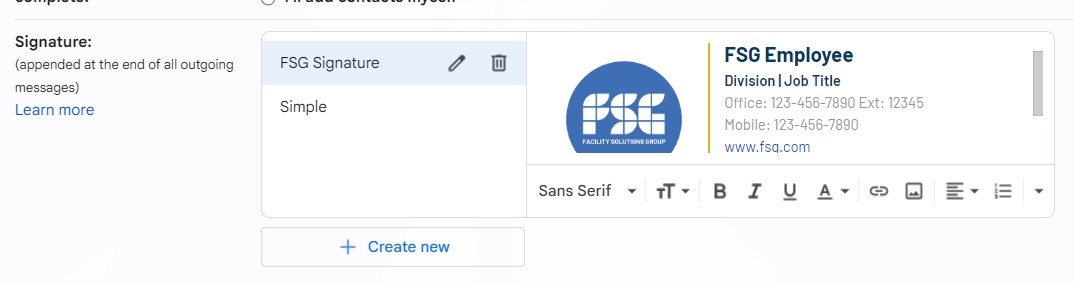
- Copy your new signature from the Email Signature Generator.
- Open Gmail, click the gear icon ⚙️ (top right), and click See all settings.
- Under the General tab, scroll to the Signature section.
- Click Create New, name it, and paste your signature in the box.
- Set it as the default for new emails and replies.
- Choose Save Changes to apply.
How to Update Your Signature in Outlook:
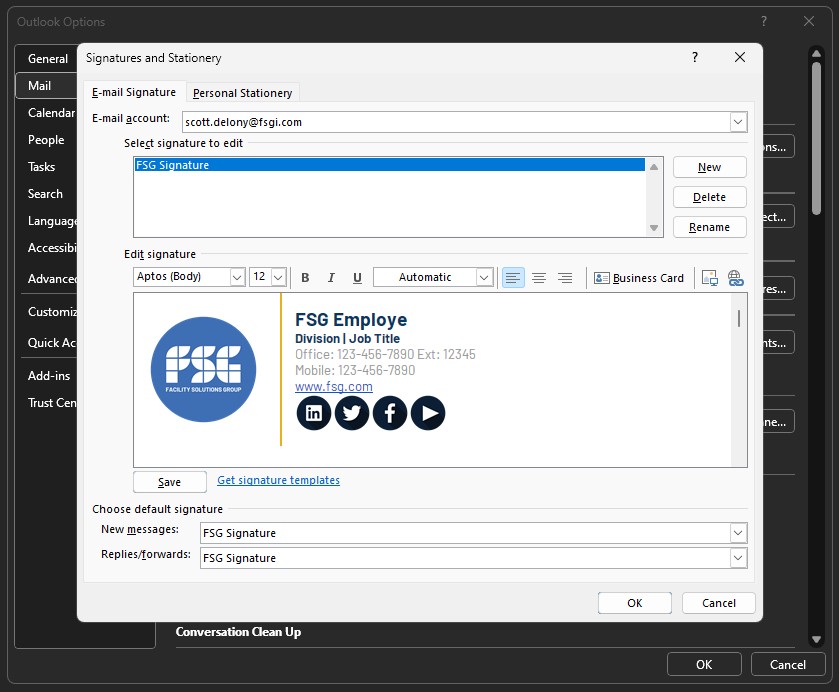
- Copy your new signature from the Email Signature Generator.
- Open Outlook and go to File>Options>Mail.
- Click Signatures, then New, and paste your signature in the box.
- Set it as the default for new emails and replies
- Click OK to save.
It only takes a few minutes, and it helps ensure we all present a consistent and professional brand for the institution. Take a moment to refresh your signature today! If you have any questions, click here to email FSG Brand Manager, Raine Robinson.
Posts on FSG Resources are all about celebrating you! If you’ve got a story to share, whether it’s a big win for your team, a personal milestone worth sharing, or a coworker you want to celebrate, shoot me an email at [email protected] so we can keep spotlighting what makes FSG great.
– Scott Delony, Communications Manager